
Ask your AI app about your own notes.
Connect AtanNote to ChatGPT, Perplexity or Claude. While it answers you, it can look things up in your notes, transcripts and to-dos. It can’t change or delete anything.
Pick your app
Three steps, about a minute. You approve on an AtanNote page with the same Google account or email code you use here.
ChatGPTAdd AtanNote to ChatGPT as a custom connector, then sign in here to approve
Until AtanNote is in ChatGPT’s app directory, you add it yourself. Custom servers need a paid ChatGPT plan.
- 1
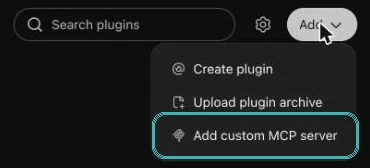
Open ChatGPT › Plugins, then Add
Plugins is in Settings › Plugins › Browse directory. In the Add menu, choose Add custom MCP server.
- 2
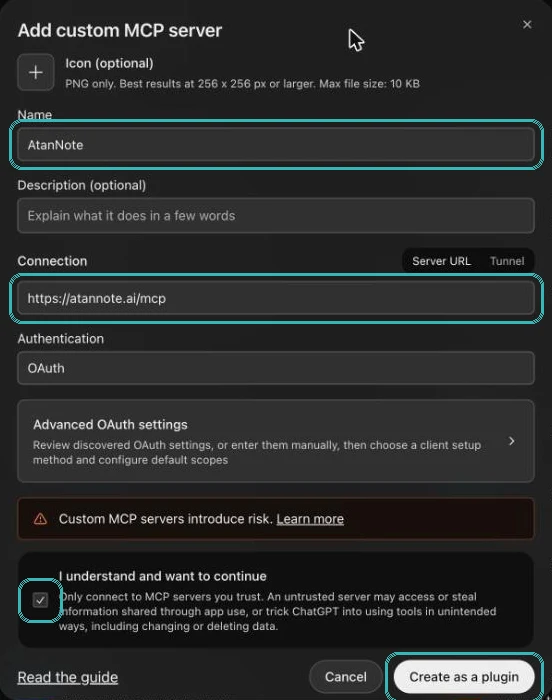
Fill in the form
Name it AtanNote and paste this address: https://atannote.ai/mcp. Keep Authentication on OAuth, tick “I understand”, then Create as a plugin.
- 3
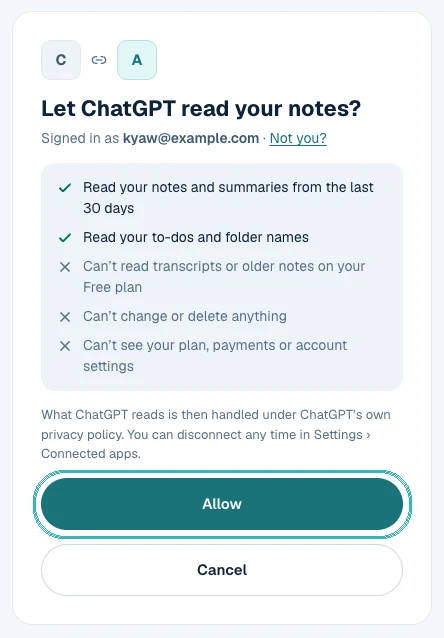
Sign in and tap Allow
Use the same Google account or email as here. Then ask ChatGPT about your notes.
PerplexityPro or Max: add AtanNote to Perplexity as a custom connector, then sign in here to approve
Until AtanNote is in Perplexity’s connector list, you add it yourself. Custom connectors need Perplexity Pro or Max. Use perplexity.ai on a computer; the phone apps may not show this yet.
- 1
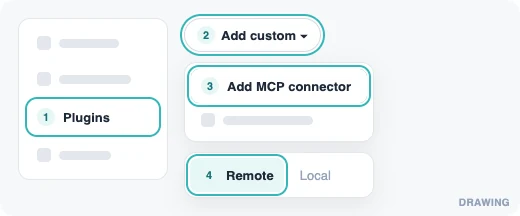
Open Perplexity › Plugins, then Add custom
Plugins is in the sidebar (on some accounts it is Customize › Connectors). Choose Add custom › Add MCP connector, then Remote.
- 2
Fill in the form
Name it AtanNote and paste this address: https://atannote.ai/mcp. Tick the box, then tap Add.
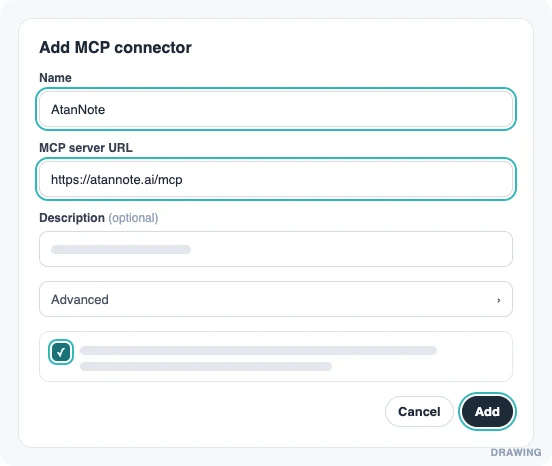
- 3
Tap the AtanNote card, sign in and tap Allow
Use the same Google account or email as here. Then turn AtanNote on in a new thread and ask about your notes.
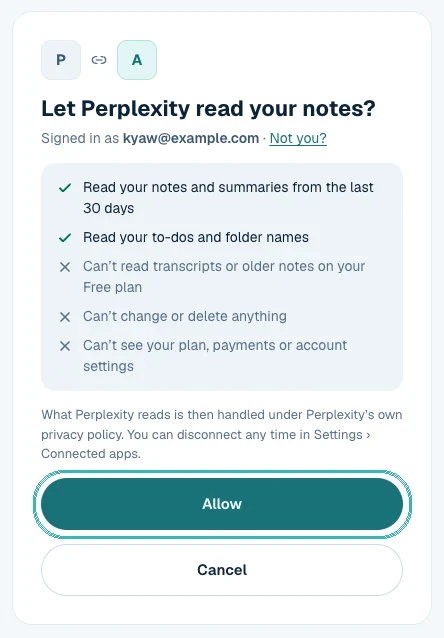
The first two pictures are drawings, not screenshots. Perplexity may look a little different for you.
Open PerplexityClaudeAdd AtanNote to Claude as a custom connector, then sign in here to approve
Until AtanNote is in Claude’s connector directory, you add it yourself. It takes about a minute.
- 1
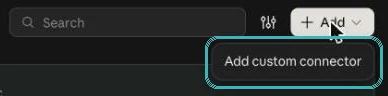
Open Claude › Customize › Connectors, then Add
On claude.ai or in the Claude desktop app. In the Add menu, choose Add custom connector.
- 2
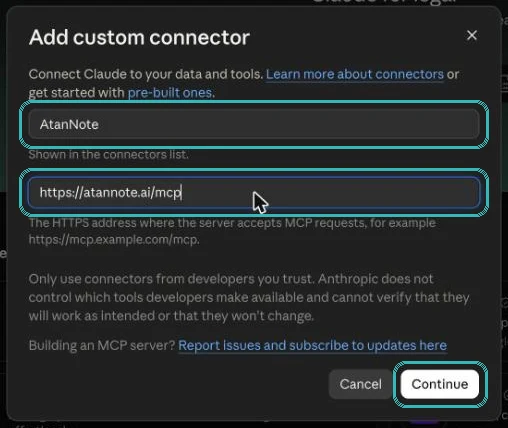
Fill in the form
Name it AtanNote and paste this address: https://atannote.ai/mcp. Then tap Continue, Add and Connect.
- 3
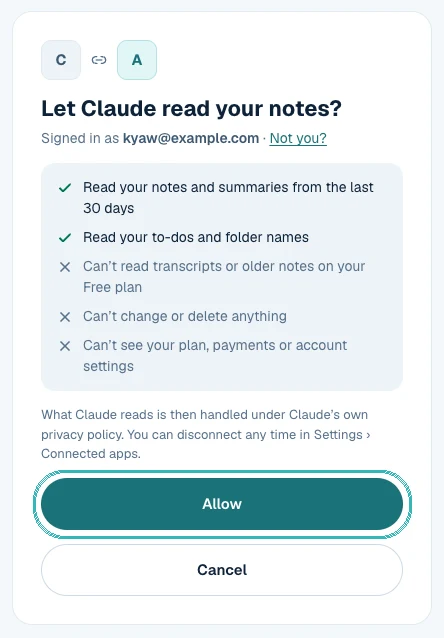
Sign in and tap Allow
Use the same Google account or email as here. Then ask Claude about your notes.
Notion AI agentsNotion Business or Enterprise: add AtanNote to a Custom Agent
Lets a Notion Custom Agent read your AtanNote notes, for example to fill a meeting database every Friday. Needs Notion Business or Enterprise.
- 1
An admin allows custom connections
In Notion, Settings › Notion AI › AI connectors. Only workspace owners and admins can turn this on.
- 2
Open your Custom Agent › Add connection › Custom MCP server
Display name AtanNote, server URL https://atannote.ai/mcp, then Save. Sign in and tap Allow on the AtanNote page.
- 3
Choose the tools
Start with Search notes, Read a note and List to-dos. Keep Save a note on “Always ask”.
Any other AI app
Paste this address where the app asks for an MCP server.
https://atannote.ai/mcpLines for developer tools
Cursor
{"mcpServers":{"atannote":{"url":"https://atannote.ai/mcp"}}}VS Code
{"servers":{"atannote":{"type":"http","url":"https://atannote.ai/mcp"}}}Gemini CLI
gemini mcp add --transport http atannote https://atannote.ai/mcpClaude Code
claude mcp add --transport http atannote https://atannote.ai/mcp
Gemini and Copilot don’t let most personal accounts add apps yet. ChatGPT and Perplexity do.
What you can ask
Twenty questions to start with, in English and Burmese. Copy one, paste it into your AI app, and change the names and dates to yours.
Meetings and work
Prepare for a meeting
Anyone with repeat clients
“What did we agree with Kyaw’s shop last time, and what is still open?”
“Kyaw ရဲ့ဆိုင်နဲ့ နောက်ဆုံးတွေ့တုန်းက ဘာတွေ သဘောတူခဲ့လဲ၊ ဘာတွေ မပြီးသေးလဲ။”
AtanNote: Searches past notes about that person, lists decisions and open to-dos.
All plans
Weekly report
Office staff, managers
“Write my weekly report for my manager from this week’s notes.”
“ဒီအပတ် မှတ်စုတွေကနေ မန်နေဂျာအတွက် အပတ်စဉ် အစီရင်ခံစာ ရေးပေးပါ။”
AtanNote: Reads the last 7 days of notes and writes one page.
All plans
Follow-up email
Sales, account managers
“Draft the follow-up email from yesterday’s client meeting, with the action items and who owns them.”
“မနေ့က ဖောက်သည်နဲ့ အစည်းအဝေးအတွက် follow-up email ကို လုပ်ရမယ့်အလုပ်တွေ၊ တာဝန်ယူသူတွေနဲ့ ရေးပေးပါ။”
AtanNote: Reads that meeting’s summary and action items; the AI app writes the email.
All plans
Turn a meeting into to-dos
Team leads
“Add the to-dos from today’s meeting to AtanNote, with due dates.”
“ဒီနေ့ အစည်းအဝေးက လုပ်ရမယ့်အလုပ်တွေကို ရက်သတ်မှတ်ပြီး AtanNote ထဲ ထည့်ပေးပါ။”
AtanNote: Adds each one to your To-do list, linked to the note.
Needs “Read and save”
What’s overdue
Anyone with a busy week
“Which of my to-dos are overdue, and what should I do first?”
“ရက်ကျော်နေတဲ့ လုပ်ရန်တွေ ဘာတွေလဲ၊ ဘာကို အရင်လုပ်သင့်လဲ။”
AtanNote: Lists open to-dos by due date and owner, with a suggested order.
All plans
Across many meetings
Buyers, owners
“How did the supplier’s price change across all our October meetings?”
“အောက်တိုဘာလ ပစ္စည်းသွင်းသူ အစည်းအဝေးတွေမှာ ဈေးနှုန်း ဘယ်လို ပြောင်းသွားလဲ။”
AtanNote: Searches every matching note and answers with sources.
All plans
Find the exact moment
Anyone who needs proof
“Where did the customer complain about delivery? Give me the link to that moment.”
“ဖောက်သည်က ပို့ဆောင်ရေးအကြောင်း ဘယ်နေရာမှာ မကျေနပ်ကြောင်း ပြောခဲ့လဲ။ အဲဒီအချိန်ကို link နဲ့ ပြပေးပါ။”
AtanNote: Finds the transcript line, with who said it and a link that plays from that second.
Pro and up · transcripts
Formal minutes or slides
Admins, secretaries
“Turn the board meeting into formal minutes, then a 5-slide outline.”
“ဘုတ်အဖွဲ့ အစည်းအဝေးကို တရားဝင် အစည်းအဝေးမှတ်တမ်း ပုံစံ ပြောင်းပေးပါ။ ပြီးရင် slide ၅ ခုစာ outline လုပ်ပေးပါ။”
AtanNote: Reads the note; the AI app reshapes it.
All plans
English for a foreign partner
Teams working abroad
“Give me Monday’s Burmese meeting in English for our partner in Singapore.”
“တနင်္လာနေ့ မြန်မာလို အစည်းအဝေးကို စင်္ကာပူက partner အတွက် အင်္ဂလိပ်လို ပြန်ပေးပါ။”
AtanNote: Reads the note; the AI app translates.
All plans
Study
Quiz from my lectures
Students
“Make 20 quiz questions from my Biology folder this month.”
“ဒီလ ဇီဝဗေဒ folder ထဲက သင်ခန်းစာတွေကနေ မေးခွန်း ၂၀ ထုတ်ပေးပါ။”
AtanNote: Lists that folder’s notes and reads them.
All plans
Explain one part again
Students
“Explain the part of lecture 3 about enzymes more simply.”
“သင်ခန်းစာ ၃ မှာ enzyme အကြောင်း ပြောတဲ့အပိုင်းကို ပိုလွယ်အောင် ရှင်းပြပေးပါ။”
AtanNote: Finds those lines in the transcript, then explains.
Pro and up · transcripts
Revision plan
Students before exams
“Make a 2-week revision plan from all my lecture notes.”
“သင်ခန်းစာ မှတ်စုအားလုံးကနေ နှစ်ပတ်စာ စာကျက်အစီအစဉ် လုပ်ပေးပါ။”
AtanNote: Reads the folder; can save the plan back as a note.
All plans
Business owners and sales
What customers ask for
Shop and service owners
“What do customers ask for most in this month’s calls?”
“ဒီလ ဖုန်းခေါ်ဆိုမှုတွေမှာ ဖောက်သည်တွေ ဘာကို အများဆုံး တောင်းဆိုကြလဲ။”
AtanNote: Asks across all notes; the answer comes in your language with sources.
All plans
Promises I made
Owners, freelancers
“What did I promise to whom, and by when?”
“ဘယ်သူ့ကို ဘာကတိပေးထားလဲ၊ ဘယ်တော့ အပြီးလုပ်ရမလဲ။”
AtanNote: Reads to-dos and searches notes for promises.
All plans
Interviews, research and content
Quotes for an article
Journalists, researchers
“Pull the best quotes from my interview with Ma Hnin, with their times.”
“မနှင်းနဲ့ အင်တာဗျူးထဲက အကောင်းဆုံး စကားတွေကို အချိန်နဲ့တကွ ထုတ်ပေးပါ။”
AtanNote: Reads the transcript; each quote links to its moment.
Pro and up · transcripts
Deep research on my notes
Planners, consultants
“Research everything in my notes about our pricing and write a report.”
“မှတ်စုအားလုံးကို ရှာပြီး ငါတို့ရဲ့ ဈေးနှုန်းသတ်မှတ်ပုံအကြောင်း အစီရင်ခံစာ ရေးပေးပါ။”
AtanNote: Deep research searches and opens many notes in one go.
Deep research in ChatGPT
Posts from voice memos
Creators, sellers
“Turn this week’s voice-memo ideas into 3 Facebook posts.”
“ဒီအပတ် voice memo အိုင်ဒီယာတွေကို Facebook post ၃ ခု ရေးပေးပါ။”
AtanNote: Reads this week’s notes; the AI app writes the posts.
All plans
Save the answer back
Everyone
“Save this plan as a note in AtanNote.”
“ဒီအစီအစဉ်ကို AtanNote မှာ မှတ်စုအဖြစ် သိမ်းပေးပါ။”
AtanNote: Saves a new note marked with the app’s name. It never edits or deletes.
Needs “Read and save”
With the AI app’s other connectors
Into Notion
Teams on Notion
“Put the action items from today’s meeting into my Notion project page.”
“ဒီနေ့ အစည်းအဝေးက လုပ်ရန်တွေကို Notion project page ထဲ ထည့်ပေးပါ။”
AtanNote: AtanNote gives the items; the AI app’s own Notion connector writes them.
Needs the AI app’s Notion connector
Into my calendar
Anyone
“Book the follow-up meeting we agreed on in my calendar.”
“သဘောတူထားတဲ့ နောက်တစ်ကြိမ် အစည်းအဝေးကို ပြက္ခဒိန်ထဲ ထည့်ပေးပါ။”
AtanNote: AtanNote finds the agreed date; the app’s calendar connector books it.
Needs the AI app’s calendar connector
What it can and can’t do
- It sees only your own notes. Never anyone else’s, and never your plan, payments or account settings.
- On Free, AI apps see notes from the last 30 days, without transcripts. Go opens your full history; Pro adds transcripts.
- It can’t change or delete anything. Saving new notes and to-dos stays off until you turn it on for that app.
- Every read and save shows in Settings › Connected apps › Recent activity, kept for 90 days.
- Disconnect any time; access stops at once. What the app already read is handled under that app’s own privacy policy.
Questions
Does it work in Burmese?
Yes. Ask in Burmese and AtanNote looks through your Burmese notes the same way, with links back to the notes it used.
Which ChatGPT plan do I need?
Until AtanNote is in ChatGPT’s app directory, adding it yourself needs a paid ChatGPT plan. Once it is listed, any ChatGPT plan works.
What about Gemini or Copilot?
Gemini and Copilot don’t let most personal accounts add apps yet. ChatGPT and Perplexity do.
Is my data used to train AI?
AtanNote never trains AI on your notes. What an AI app reads is then handled under that app’s own privacy policy, so connect only apps you trust.